Form Builder
Reusable, Zod-first form system powered by FormBuilder and useFormBuilder.
AI Skill for forms
Prompt: Type
/forms in your Copilot / Cursor or other chat to use skill with the provided context./forms Build this form using the shared Form Builder. Requirements: - Form values type: [YourType] - Fields: [list fields] - Validation rules: [list zod rules] - Submit behavior: [create/update + api/action]
Overview
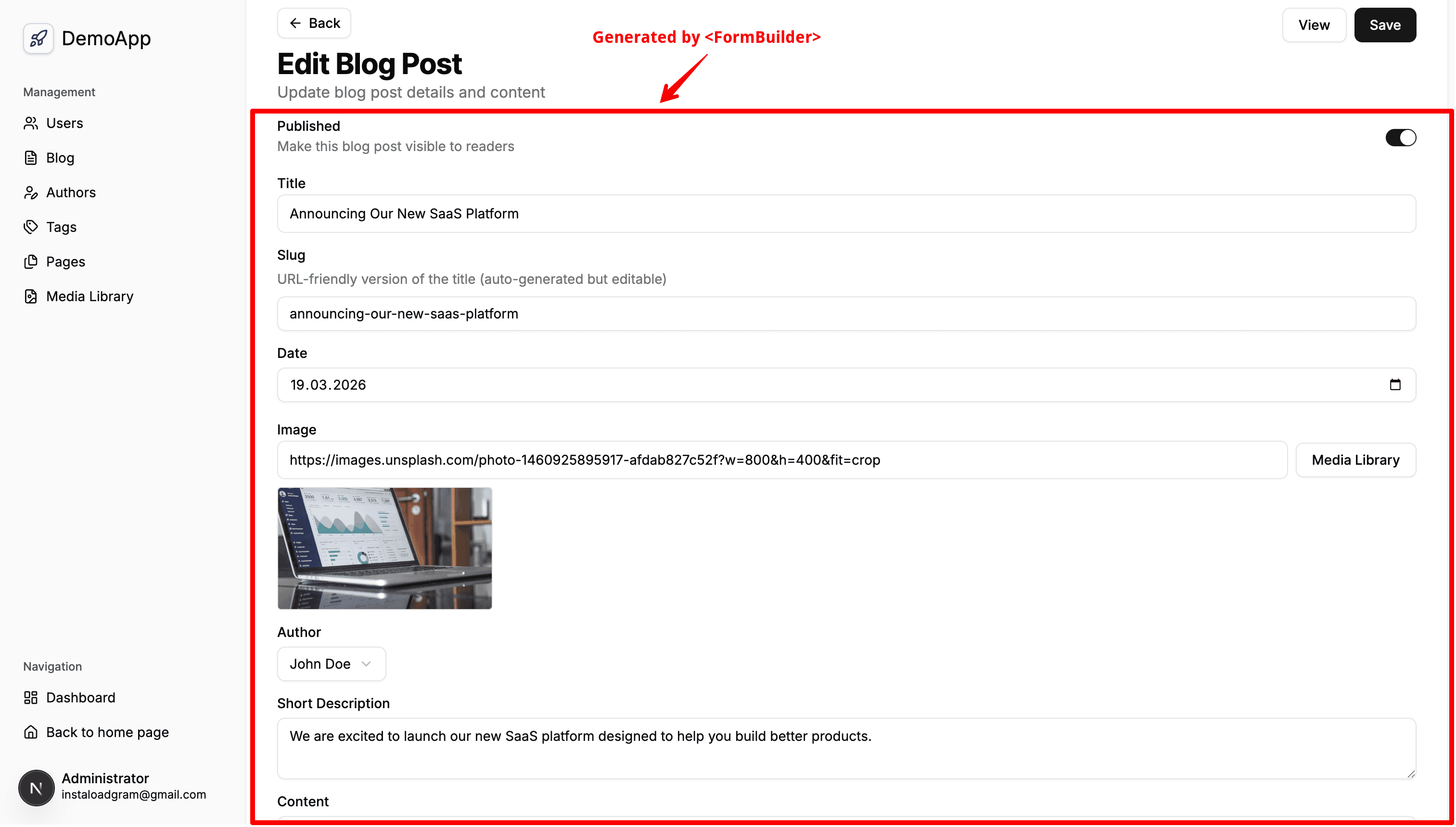
@/shared/components/form-builder provides typed, reusable form rendering on top of react-hook-form with Zod v4 validation.
Use it when you want:
- Consistent shadcn field rendering
- Per-field validation errors (
FormMessage) - Array-based UI schema with optional sections/separators
- Default or custom action area (
Cancel + Save)
Quick Start
import { z } from 'zod';
import { FormBuilder, type FormBuilderUiSchema } from '@/shared/components/form-builder';

const schema = z.object({
  title: z.string().min(1, 'Title is required'),
  published: z.boolean().default(false),
});

type Values = z.infer<typeof schema>;

const uiSchema: FormBuilderUiSchema<Values> = [
  {
    type: 'text',
    name: 'title',
    label: 'Title',
    placeholder: 'Enter title',
  },
  {
    type: 'switch',
    name: 'published',
    label: 'Published',
  },
];

export function PostForm() {
  return (
    <FormBuilder
      schema={schema}
      uiSchema={uiSchema}
      defaultValues={{ title: '', published: false }}
      onSuccess={async (values) => {
        // call server action / mutation here
        console.log(values);
      }}
    />
  );
}
useFormBuilder + Controlled Form
Use this mode when you need direct form control (watch, setValue, reset, etc.).
import { z } from 'zod';
import { FormBuilder, useFormBuilder, type FormBuilderUiSchema } from '@/shared/components/form-builder';

const schema = z.object({
  slug: z.string().min(1),
  shortDescription: z.string().min(10),
});

type Values = z.infer<typeof schema>;

const uiSchema: FormBuilderUiSchema<Values> = [
  {
    type: 'text',
    name: 'slug',
    label: 'Slug',
    placeholder: 'my-post-slug',
  },
  {
    type: 'textarea',
    name: 'shortDescription',
    label: 'Short description',
    rows: 3,
  },
];

export function ControlledPostForm() {
  const { form } = useFormBuilder({
    schema,
    defaultValues: { slug: '', shortDescription: '' },
  });

  return (
    <FormBuilder
      schema={schema}
      uiSchema={uiSchema}
      form={form}
      onSuccess={async (values) => {
        console.log(values);
      }}
    />
  );
}
Sections and Separators
section and separator items require stable id values.
const uiSchema: FormBuilderUiSchema<Values> = [
  {
    kind: 'section',
    id: 'content-main',
    title: 'Main Content',
    fields: [
      { type: 'text', name: 'title', label: 'Title' },
      { type: 'richtext', name: 'content', label: 'Content' },
    ],
  },
  {
    kind: 'separator',
    id: 'content-seo-divider',
    label: 'SEO',
  },
  {
    kind: 'section',
    id: 'content-seo',
    fields: [
      { type: 'text', name: 'metaTitle', label: 'Meta title' },
      { type: 'textarea', name: 'metaDescription', label: 'Meta description' },
    ],
  },
];
Custom Action Area
If children are passed to FormBuilder, they replace default Cancel + Save buttons.
<FormBuilder schema={schema} uiSchema={uiSchema} form={form} onSuccess={onSubmit}>
  <div className='flex justify-end gap-2'>
    <button type='button' onClick={() => form.reset()}>
      Reset
    </button>
    <button type='submit' disabled={form.formState.isSubmitting}>
      {form.formState.isSubmitting ? 'Saving...' : 'Save Post'}
    </button>
  </div>
</FormBuilder>
Supported Field Types
text,textarea,switch,date,select,radio,checkbox,choice-cardmedia(File[]values),mediaLibrary(URL picker),upload,filerichtext(markdown string in/out),combobox
Implementation Notes
- Keep feature forms thin: define
schema,uiSchema, andonSuccess; let Form Builder handle form plumbing. - Labels/descriptions/placeholders are plain strings.
- Keep custom field renderer files in
src/shared/components/form-builder/fieldswhen adding new field types.